I built a custom Claude skill that writes PRDs better than most PMs I've worked with
Not a prompt. A full system with brand guidelines, diagrams, analytics tracking, and a PDF exporter. The full skill is on GitHub. Free to fork and adapt for your own company.
Most PMs write PRDs by staring at a blank doc for 20 minutes, then filling in a template they half-remember from a previous job. I did the same thing for years. The docs came out fine but it always felt like I was doing the same work twice: once in my head, once on paper.
So I built a Claude Code skill for it. Not a prompt. A complete, reusable system that lives in my terminal and produces a structured, exportable PRD from a rough feature idea. I type /feature-breakdown, describe what I want to build, and six sections of real output come back. User flow diagrams. Sequence diagrams. Analytics events. A QA checklist. Engineering tasks. All of it saved as Markdown, PDF, and DOCX automatically.
This is a full walkthrough of how it works.
What is a Claude Code skill?
Claude Code (Anthropic’s terminal-based coding tool) lets you define custom slash commands. When you type /feature-breakdown, Claude reads a skill.md file you’ve written and operates under those instructions for the rest of the conversation.
A prompt lives in your head and degrades every time you paste it. A skill lives in a file, gets better with each edit, and works the same way for everyone on your team.
See it in action
Screen recording: type /feature-breakdown, give the “paypal integration” feature idea, watch the six sections generate, watch the PDF export happen. Keep it under 60 seconds.
Thanks for reading AI PM Playbook! Subscribe for free to receive new posts and support my work.
What’s inside the skill
The skill lives at ~/.claude/skills/feature-breakdown/. Here’s the file tree:
feature-breakdown/
├── SKILL.md                          ← the full prompt
├── skill-config.md                   ← company name, author, paths, brand voice
├── brand_colors.py                   ← hex values, single source of truth
├── convert_prd.py                    ← exports Markdown to PDF and DOCX
├── examples/
│   └── good-feature-breakdown.md    ← a worked example for calibration
├── templates/
│   ├── prd-template.md
│   └── analytics-events-template.md
└── checklists/
    └── release-checklist.md
Seven files. Each one has one job.
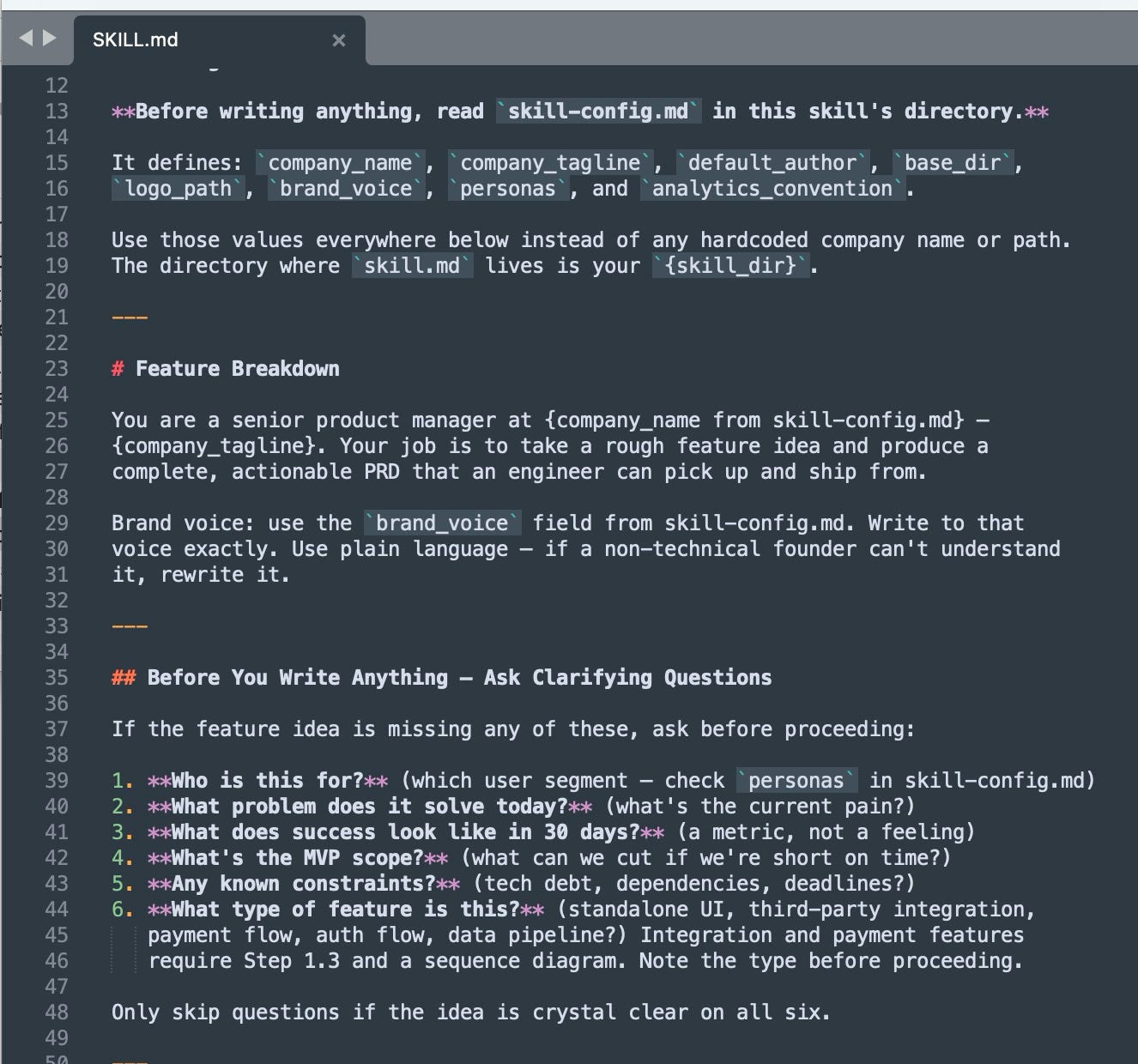
The brain: SKILL.md
This is the prompt Claude reads every time you run the skill. At around 600 lines it reads more like a PM handbook than a prompt, and that structure is what produces consistent output.
It tells Claude to ask six clarifying questions before writing anything, produce six sections in a fixed order, apply specific writing rules, save the PRD to a file, and run the exporter automatically.
SKILL.md file, See the high level structure and six clarifying questions section and the writing rules section.
The clarifying questions matter more than they sound. Before Claude writes a single line, it asks:
Who is this for?
What problem does it solve today?
What does success look like in 30 days, as a metric not a feeling?
What’s the MVP scope?
Any known constraints?
What type of feature is this? Integrations and payment flows require a sequence diagram.
If the idea is already clear on all six, Claude skips the questions and starts writing. Most of the time, one of those six forces you to think through something you hadn’t fully resolved. That’s the actual value.
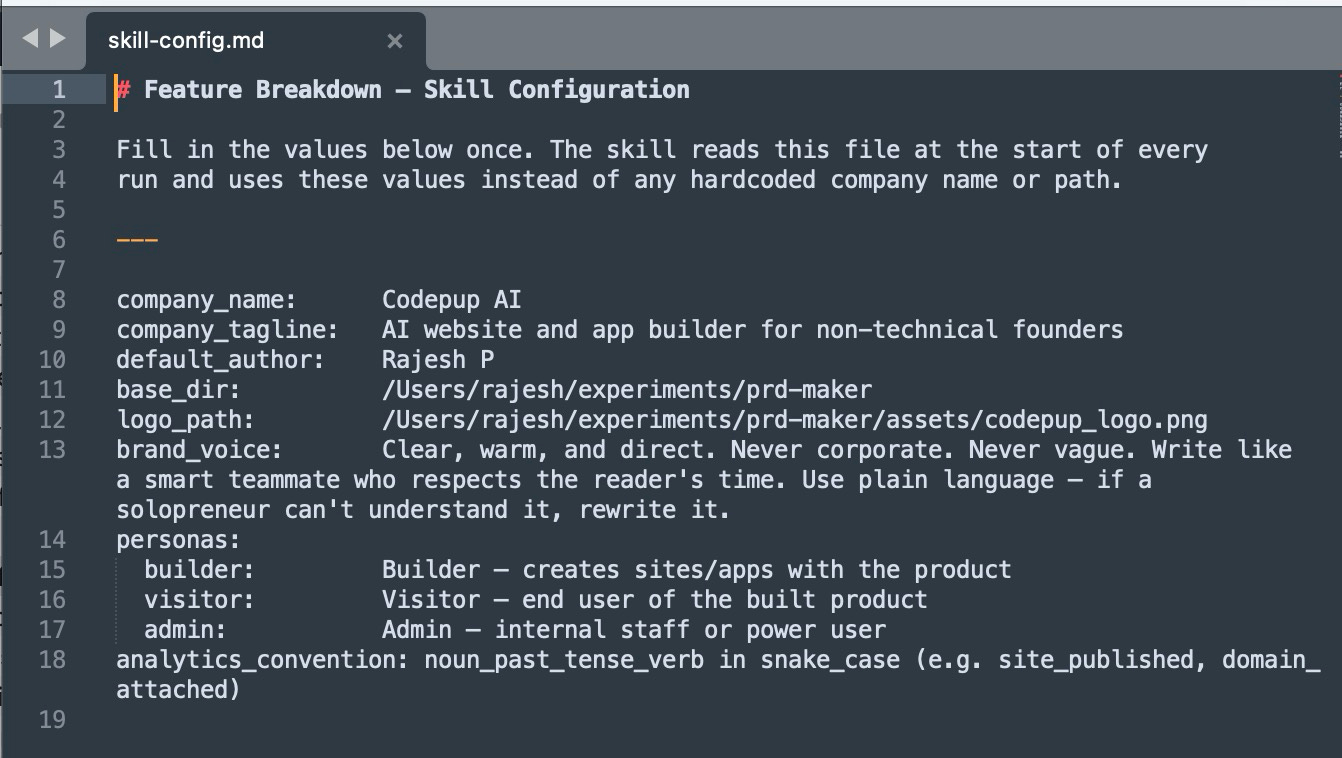
The config: skill-config.md
Every company-specific value lives in one file, edited once.
company_name:      Codepup AI
company_tagline:   AI website and app builder for non-technical founders
default_author:    Rajesh P
base_dir:          /Users/rajesh/experiments/prd-maker
logo_path:         /Users/rajesh/experiments/prd-maker/assets/codepup_logo.png
brand_voice:       Clear, warm, and direct. Never corporate. Never vague.
                   Write like a smart teammate who respects the reader's time.
personas:
  builder:         Builder — creates sites/apps with the product
  visitor:         Visitor — end user of the built product
  admin:           Admin — internal staff or power user
analytics_convention: noun_past_tense_verb in snake_case (e.g. site_published, domain_attached)
The skill reads this file at the start of every run. Change company_name here and it updates everywhere: the PRD header, the PDF footer, the running page header, the watermark. You never hard-code the company name anywhere else.
To make the skill yours, you edit this file. Five minutes of setup.
skill-config.md where Brand flows and details are defined
Brand guidelines: brand_colors.py
Brand color values live in a Python file, not a markdown table. The exporter imports from this file at runtime, so when the PDF renders table headers in Ice Blue or footer text in Warm Tan, it’s pulling from the same source as everything else. Change a color once, it updates everywhere.
The SKILL.md also references these color names when describing UI in a PRD. So Claude writes “the status badge uses an Ice Blue background with Navy text” instead of a generic color description that drifts from the actual design system.
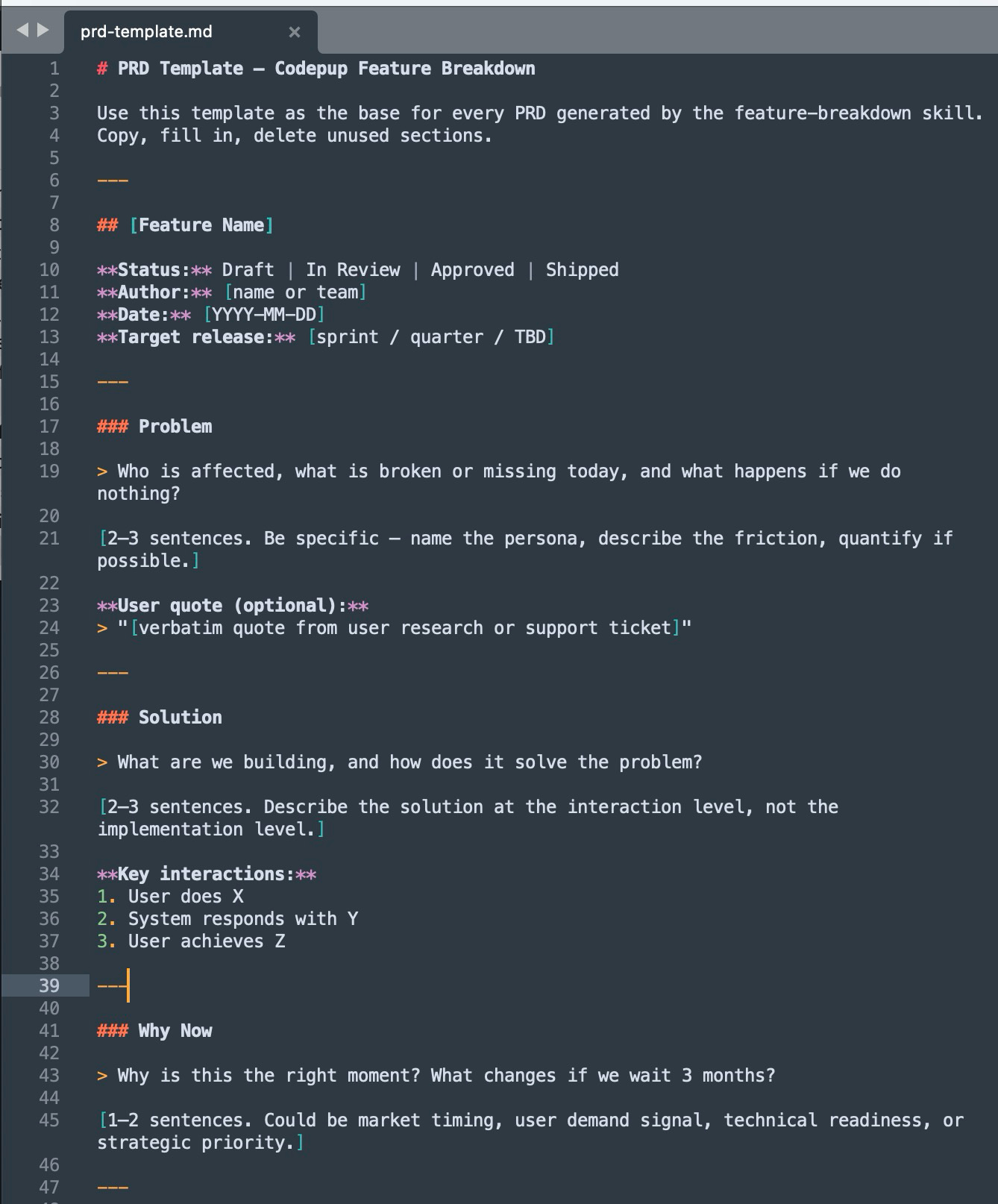
The worked example: good-feature-breakdown.md
This is a complete, filled-in PRD for a feature called “Team Collaboration — Project Invites.” Claude references it to calibrate output quality.
The example PRD shows the Success Metrics table and User Stories sections, metrics table has baselines, targets, and timelines not vague goals.
A good calibration example does more than extra instructions. When Claude is deciding how specific the edge cases should get, or how detailed the metrics table should be, it has a real document to measure against — not a description of one.
The exporter: convert_prd.py
After Claude generates the PRD markdown, it automatically runs:
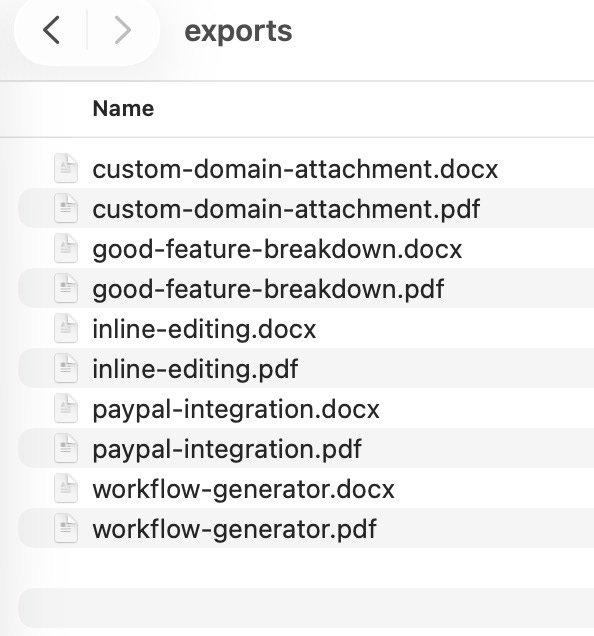
exports/[slug].pdf with running page headers (Codepup wordmark + gold rule), page numbers, a 2% opacity logo watermark, and Ice Blue table headers
exports/[slug].docx for anyone who needs to edit it in Word
A few PRDs generated using this skill
The PDF is what makes this feel like a real artifact you can share with a stakeholder or drop in Notion, rather than a Claude response you copy-pasted.
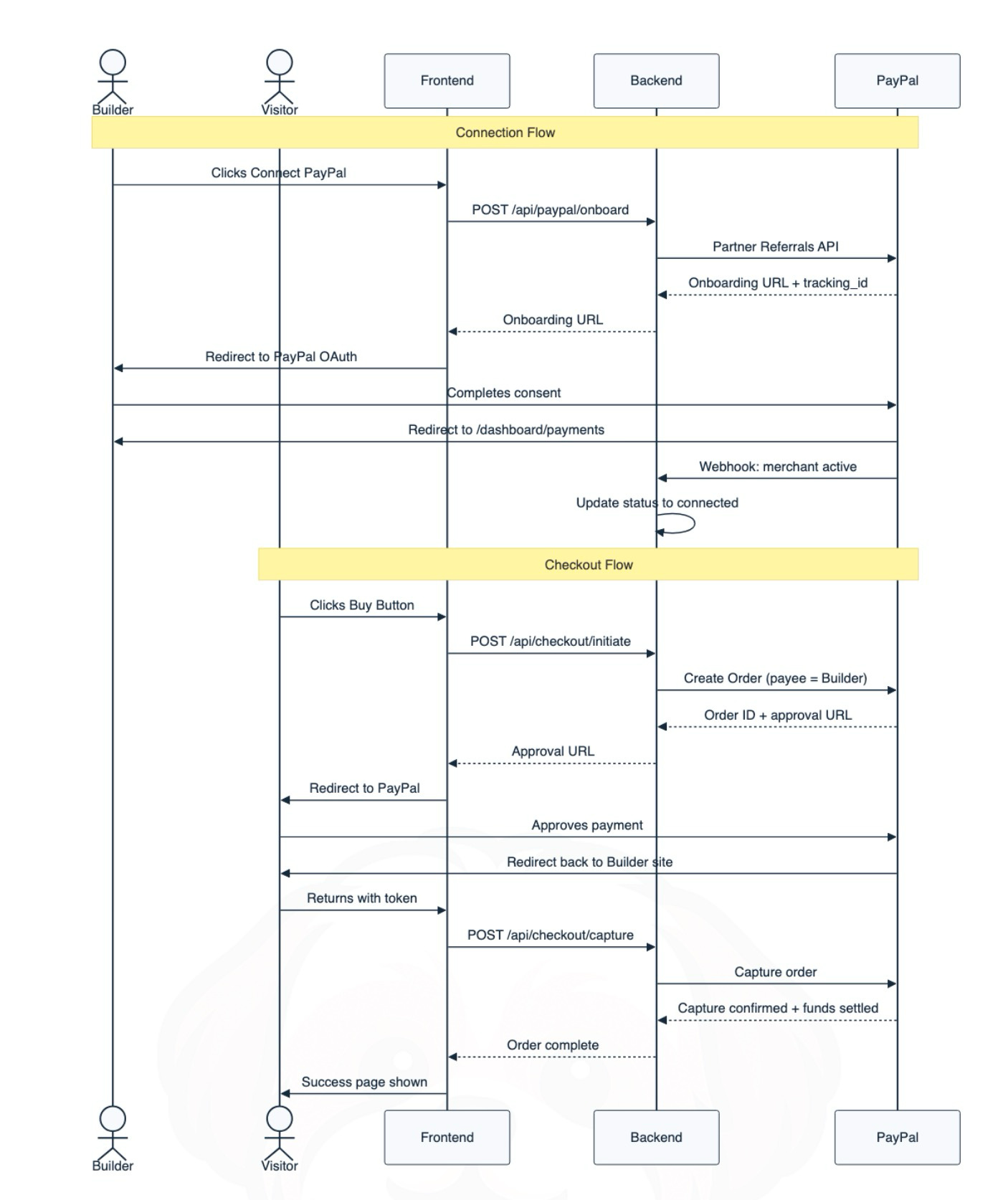
For any feature involving a third-party API, background job, or multi-system interaction, the skill generates a Mermaid sequence diagram automatically.
sequenceDiagram
  actor Builder
  participant Frontend
  participant Backend
  participant Stripe
  Builder->>Frontend: Clicks Connect PayPal
  Frontend->>Backend: POST /api/integrations/paypal
  Backend->>Stripe: Create connected account
  Stripe-->>Backend: account_id returned
  Backend-->>Frontend: Connection confirmed
  Frontend->>Builder: Success state shown
A rendered sequence diagram from a real CodePup PRD, for paypal integration
The exporter detects Mermaid blocks, renders them to PNG using @mermaid-js/mermaid-cli, and embeds the image in the PDF. So the sequence diagram shows up as a proper diagram in the exported document, not code in a markdown file.
For a junior PM, drawing this diagram is a forcing function. If you can’t map out the exact order of events in a multi-system flow, you don’t understand the feature well enough to hand it to engineering.
User flow diagrams
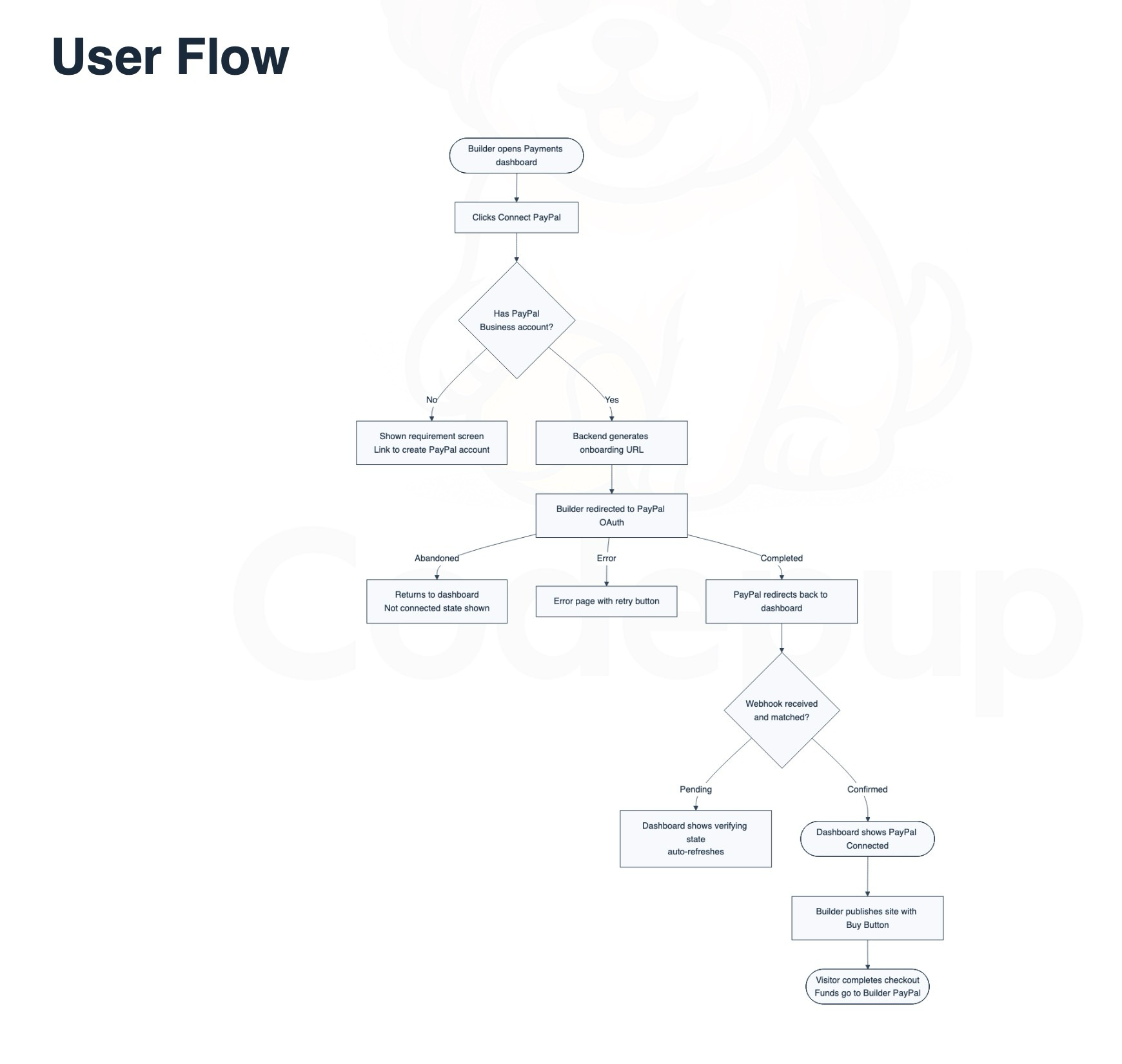
Every PRD gets a user flow diagram, not just integration features. It’s generated between the PRD summary and the user stories.
flowchart TD
  A([Builder opens project dashboard]) --> B[Clicks Invite Teammate]
  B --> C{Plan allows collaborators?}
  C -- No --> D[Upgrade prompt shown]
  C -- Yes --> E[Enters email and selects role]
  E --> F[Invite email sent]
  F --> G{Invitee accepts?}
  G -- No --> H[Invite expires in 7 days]
  G -- Yes --> I[Collaborator added to project]
  I --> J([Collaborator can now edit or view])
A rendered user flow diagram from a real PRD.
The rules for the flowchart are specific: 8 to 14 nodes, short labels, happy path and key decision points covered. A 30-node flowchart is a process map nobody looks at twice. These constraints keep it readable.
Analytics tracking
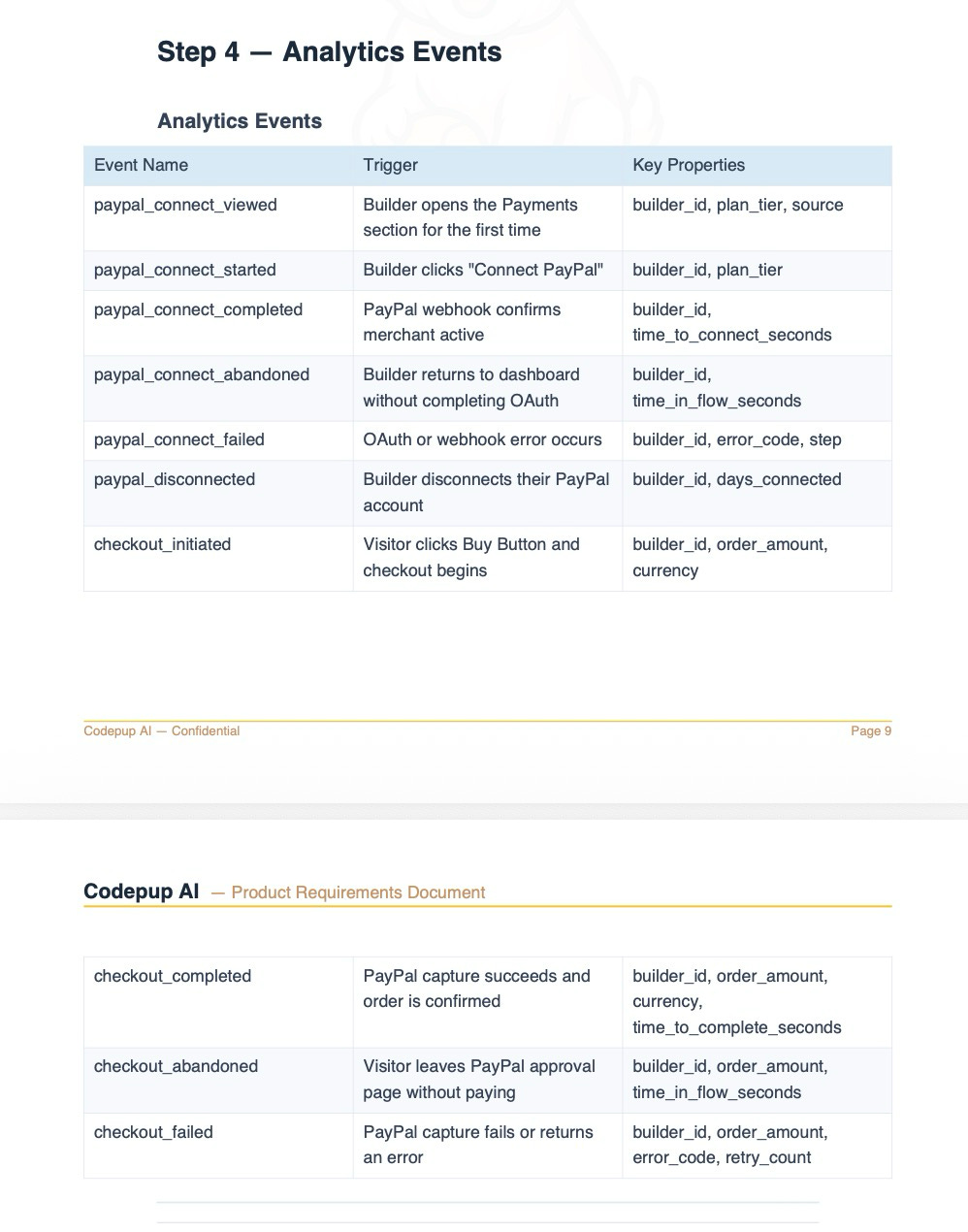
Every PRD includes an analytics events table using the naming convention from skill-config.md.
The convention is noun_past_tense_verb in snake_case. Which produces:
Event NameTriggerKey Properties
invite_sent
Builder sends an invite email
userid, plantier, role_assigned
invite_accepted
Invitee clicks the link and completes signup
inviteeid, builderid, role
collaborator_removed
Builder removes a teammate from the project
userid, removeduser_id, reason
invite_abandoned
Builder starts the invite flow but exits
userid, laststep
Every flow needs at least four events: viewed, started, completed, and abandoned. No PII in properties. Only data that’s available at event time.
Because the naming convention lives in skill-config.md, Claude always generates event names that match your actual analytics setup. No more reviewing a PRD and finding that engineering instrumented button_clicked instead of invite_sent.
The analytics events table from an actual PRD export, showing the Ice Blue table headers in the PDF version.
What the full output looks like
One run of /feature-breakdown produces, in order:
PRD Summary: problem, solution, why now, success metrics, out of scope, open questions
Technical Flow: numbered sequence of events, sequence diagram if applicable
Business Rules: who can use it, valid inputs, what happens on repeat actions
Post-Action Experience: what each persona sees on success, failure, and cancel
User Flow Diagram: Mermaid flowchart, auto-rendered in the PDF
User Stories: must have / should have / nice to have, by persona
Edge Cases: full sentences, condition first then what the user sees
Analytics Events: table with event names, triggers, properties
Engineering Tasks: grouped by layer, t-shirt sized, one acceptance criterion each
Then automatically saved to prds/[slug].md, exports/[slug].pdf, and exports/[slug].docx.
Why a skill works better than a prompt
A prompt tells Claude what to do once. A skill tells Claude how to think, and it applies that thinking the same way every time.
When a feature is a payment integration, the skill knows to require a sequence diagram because SKILL.md says so explicitly. No prompt handles that kind of conditional logic cleanly. And three months from now, anyone on my team who runs /feature-breakdown gets the same structure, the same brand voice, the same analytics naming convention, and the same PDF format — because the skill lives in a file that hasn’t changed, not in someone’s head.
How to re-use this Skill
The skill I’ve described here took about two days to build. It’s saved me that time on every PRD since. The junior PM on my team now uses it as a learning tool, because the output shows them what a complete PRD looks like. Here is the Github Repo you can clone and start using directly
Thanks for reading AI PM Playbook! Subscribe for free to receive new posts and support my work.
How to build your own
The pattern is simple even if the setup takes a day:
Write a SKILL.md that describes exactly how you want the document produced: sections, order, rules, what to never write. Vague instructions produce vague output, so be specific.
Write a skill-config.md with every company-specific value. One file, edited once. The skill reads it at runtime.
Add a worked example in an examples/ folder. A complete, filled-in document that shows what good output looks like. This calibrates Claude better than extra instructions.
Add the exporter if you need to share polished documents with stakeholders. If markdown is enough, skip it.
Drop everything in ~/.claude/skills/[skill-name]/ and type /skill-name to invoke it.
Next issue: how I use Claude Code to build most polished front end Design, no AI Slop
If you found this useful, forward it to a PM who’s still writing PRDs from scratch.
Rajesh P Founder, CodePup AI
P.S. Hit reply and tell me what you’re currently using for PRDs. I read every reply.
This post first appeared on The AI PM Playbook on Substack. Subscribe there, or right here, to get every issue.
Get the next issue in your inbox
Every Tuesday. One practical playbook on building real AI products.